VoIP Office Phone Guide 2025: Essential Steps for Success
Master VoIP office phone success in 2025 with this expert guide covering planning, providers, setup, security, and integration for seamless business communic
Iacopo Bonandi, Founder & CEO
November 12, 2025Are you ready to revolutionize your business communication with a voip office phone in 2025? As technology advances, choosing the right system is crucial for efficiency and growth.
In this guide, you will uncover practical steps to implement and optimize a modern voip office phone solution. We will break down the essentials, from understanding VoIP basics to selecting the best provider, setting up your system, securing your network, integrating tools, and future-proofing your investment.
Unlock cost savings, flexibility, and seamless connections for your workplace. Let’s explore how to achieve success with a voip office phone strategy designed for the demands of today and tomorrow.
Understanding VoIP Office Phones in 2025
Voice over Internet Protocol, or VoIP office phone, is rapidly redefining business communication in 2025. Companies are turning to VoIP solutions to streamline operations, boost flexibility, and support the modern workplace. Let’s break down the fundamentals, advantages, advancements, and common misconceptions that shape today’s VoIP office phone landscape.
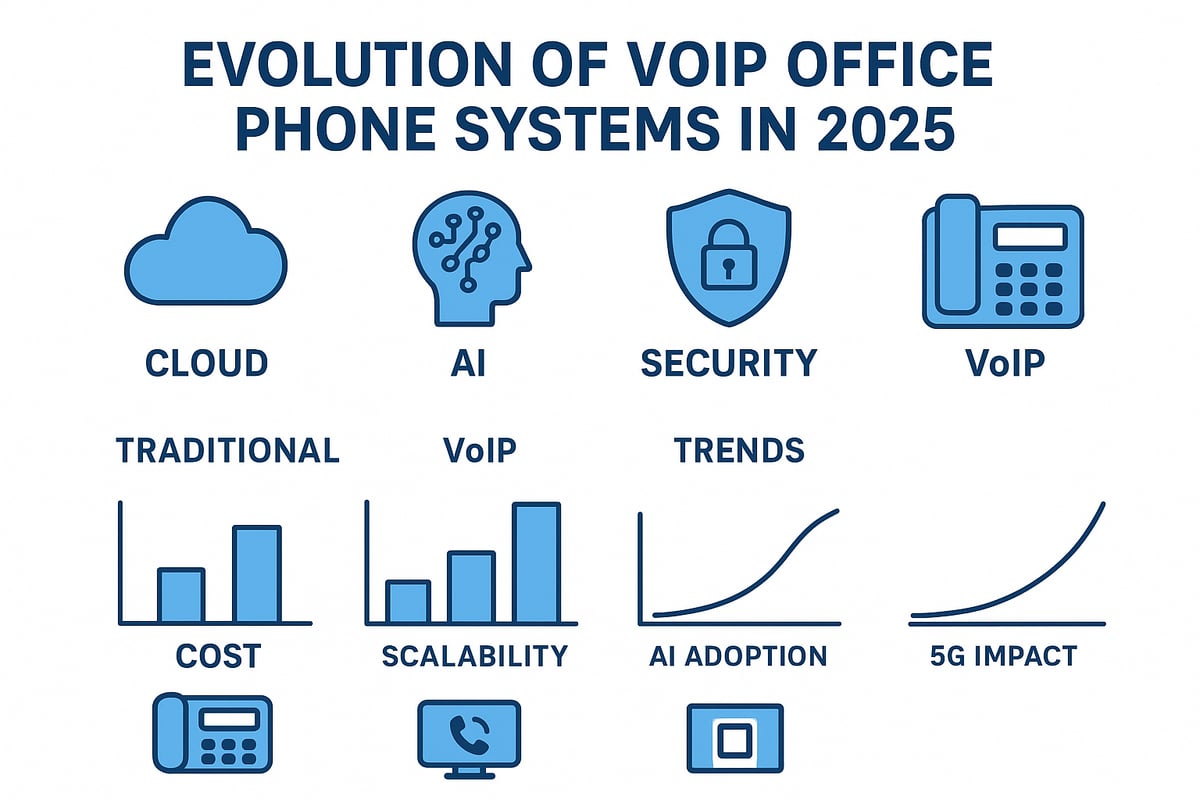
What is VoIP and How Does It Work?
A VoIP office phone transforms voice signals into digital data, sending them over the internet rather than traditional copper wires. This technology lets users make calls from anywhere with a reliable internet connection, using computers, desk phones, or mobile devices.
Unlike old landline systems, a VoIP office phone system uses software and cloud infrastructure for flexibility and cost-efficiency. For example, a small business with remote teams can connect employees seamlessly, regardless of location, using a single VoIP office phone platform.
Key Benefits of VoIP for Modern Offices
Modern offices benefit from VoIP office phone systems in several important ways:
- Cost savings: Businesses save up to 60% compared to landlines.
- Scalability: Easily add or remove users as teams change.
- Mobility: Staff can answer calls from any device, anywhere.
- Integration: Connect the VoIP office phone with CRM, email, or helpdesk software.
For instance, a company with international clients can drastically cut call expenses and manage all communications through their VoIP office phone solution.
Emerging Trends and Technologies in 2025
In 2025, the VoIP office phone is evolving with new technologies:
- AI-powered analytics give deep insights into call quality and customer needs.
- 5G networks enhance call reliability and speed for the VoIP office phone.
- Advanced security protocols, such as end-to-end encryption, protect communications.
- Unified communications platforms merge calls, video, and chat into one VoIP office phone interface.
These trends make the VoIP office phone a future-proof investment for any forward-thinking business.
Common VoIP Myths and Misconceptions
Many believe a VoIP office phone is less reliable than traditional systems, but modern internet speeds and robust infrastructure have closed that gap. Today’s VoIP office phone solutions deliver excellent call quality, often surpassing PSTN.
Security is another concern, yet providers now offer strong encryption and fraud prevention. VoIP office phone technology is not just for tech companies; law firms, healthcare, and even retail businesses are adopting it for its reliability and flexibility.
VoIP Office Phone System Types
Businesses can choose from several VoIP office phone system types:
- Hosted (cloud-based): Managed by a provider, ideal for fast setup.
- On-premises: Equipment stays in-house, offering more control.
- Hybrid: Combines features of both cloud and on-site systems.
- Softphones: Apps on computers or smartphones.
- Desk phones: Physical VoIP office phone devices.
Small and medium businesses may prefer cloud solutions for simplicity, while enterprises might opt for hybrid systems. For a deeper dive into the options, see this overview of VoIP phone system types.
Step 1: Planning Your VoIP Office Phone Implementation
Embarking on a successful voip office phone upgrade starts with a strategic approach. Careful planning ensures your system not only meets current needs but also adapts to future growth.
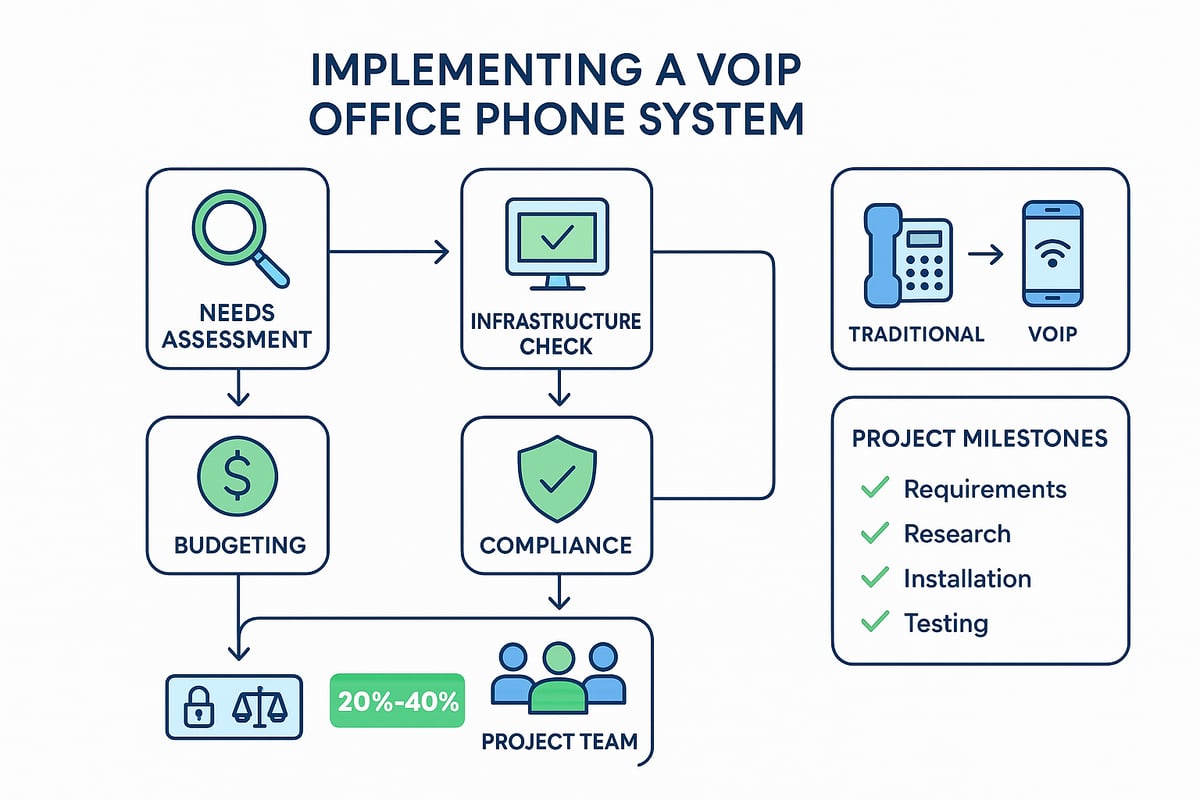
Assessing Communication Needs and Goals
Begin by mapping out your organization’s unique communication requirements. Identify call volumes, remote work expectations, and collaboration needs for each team or department.
For example, a law firm may prioritize secure, reliable client calls, while a tech startup might need flexibility for remote workers and app integrations. This assessment sets the foundation for selecting the right voip office phone features and capacity.
Outline specific goals, such as reducing costs, improving call quality, or enabling seamless communication for distributed teams. Aligning your voip office phone system with business objectives ensures lasting value.
Evaluating Current Infrastructure
Next, assess your existing network and hardware to guarantee compatibility with a voip office phone solution. Confirm your internet connection supports a minimum of 100 kbps per call for quality audio.
Review network equipment like routers and switches for VoIP readiness, and plan for power backups to maintain service during outages. For a deeper dive into bandwidth and connectivity standards, consult the Bandwidth requirements for VoIP guide.
Addressing these technical factors early prevents service disruptions and maximizes the voip office phone system’s performance.
Budgeting and Cost Analysis
Effective budgeting distinguishes between upfront investments and ongoing expenses of your voip office phone deployment. Consider hardware, setup fees, software licensing, and training costs.
Hidden fees, such as number porting or advanced feature add-ons, can impact your total cost of ownership. Use this sample table to organize your analysis:
| Expense Category | Upfront Cost | Recurring Cost |
|---|---|---|
| Hardware | ✔ | ✗ |
| Software | ✔ | ✔ |
| Training | ✔ | ✗ |
| Support | ✗ | ✔ |
Calculate ROI by projecting cost savings from reduced long-distance charges and lower maintenance compared to legacy systems. A well-planned voip office phone budget avoids surprises and supports scalability.
Regulatory and Compliance Considerations
Regulatory compliance is essential when implementing a voip office phone system. Ensure all locations meet E911 regulations for emergency call routing.
Review data privacy laws like GDPR or HIPAA, especially if your business handles sensitive customer information. Industry-specific rules may also apply, requiring secure call recording and data retention policies.
Document compliance requirements early so your voip office phone solution aligns with legal standards and avoids costly penalties.
Building a Project Timeline and Team
Establish a clear project timeline with key milestones, including research, testing, rollout, and training. Assign dedicated stakeholders from IT, operations, and management to oversee each phase.
- Research solutions and providers
- Test system compatibility and features
- Roll out the voip office phone system in stages
- Deliver staff training and support
A well-structured team and schedule ensure a smooth transition and long-term success for your voip office phone deployment.
Step 2: Choosing the Right VoIP Provider and Solution
Selecting the right VoIP office phone provider is a pivotal decision for any organization aiming to modernize communications in 2025. The right system will empower your team, streamline workflows, and support business growth. Let us break down the essential steps to guide your decision.
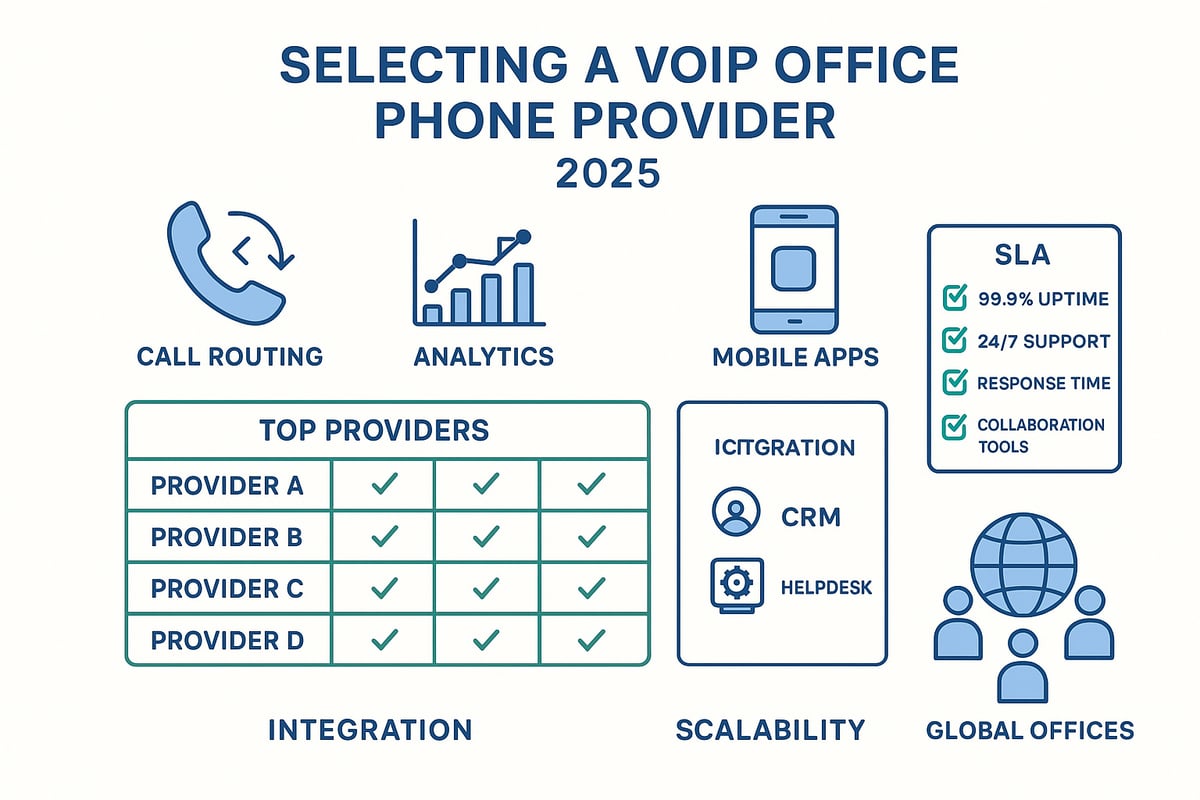
Essential Features to Look For
When evaluating a VoIP office phone solution, prioritize features that align with your operational goals. Look for:
- Call routing and auto-attendant to manage inbound calls smoothly
- Voicemail-to-email for improved accessibility
- HD voice quality and call recording for clear, reliable communication
- Analytics dashboards to monitor call activity and performance
- Mobile and desktop apps to support hybrid and remote work
A feature-rich voip office phone system ensures your business remains agile and responsive as needs evolve. Always match features to the daily demands of your team.
Comparing Top VoIP Providers in 2025
The landscape of voip office phone providers in 2025 is both competitive and innovative. Leading names such as RingCentral, 8x8, and Nextiva offer robust solutions for businesses of all sizes. Consider the following comparison:
| Provider | Key Features | Uptime Guarantee | Support Rating |
|---|---|---|---|
| RingCentral | Unified comms, CRM | 99.999% | 4.7/5 |
| 8x8 | Global numbers, AI | 99.99% | 4.6/5 |
| Nextiva | Analytics, automation | 99.999% | 4.8/5 |
For a detailed comparison of current leaders, visit the Best VoIP business phone service resource. Review customer support, uptime guarantees, and real-world user reviews before making a choice. Your voip office phone provider should offer both reliability and flexibility.
Understanding Service Level Agreements (SLAs)
Service Level Agreements are the backbone of trust between your business and the voip office phone provider. A robust SLA should guarantee at least 99.99% uptime, ensuring your system is always available. Key clauses to examine include:
- Support response times for critical issues
- Clear escalation procedures for outages
- Penalties or credits for missed targets
For enterprises, a transparent SLA is essential to minimize risk and ensure operational continuity. Always review SLA terms in detail before signing with any voip office phone vendor.
Customization and Integration Capabilities
Modern businesses often require their voip office phone system to integrate seamlessly with existing tools. Top solutions provide:
- API access for building custom workflows
- Native integration with CRM, ERP, and helpdesk platforms
- Automation features, such as click-to-call from within sales software
For example, integrating your voip office phone with a CRM enables instant access to customer data during calls, boosting sales and support efficiency. Opt for a provider that supports the integrations your business relies on daily.
Scalability and Future Growth
Your voip office phone solution should scale effortlessly as your business expands. Look for features such as:
- Easy user management for onboarding and offboarding staff
- Global number portability to support multiple locations
- Flexible licensing to adjust as needs change
Scalability ensures your communications remain consistent whether you are opening a new branch or expanding internationally. A future-ready voip office phone system grows with your ambitions.
Step 3: Setting Up and Configuring Your VoIP System
Transitioning to a modern voip office phone setup requires careful planning and execution. Each step, from hardware choices to final testing, impacts the success and reliability of your communications. By following a structured approach, your organization can maximize call quality, security, and user adoption.
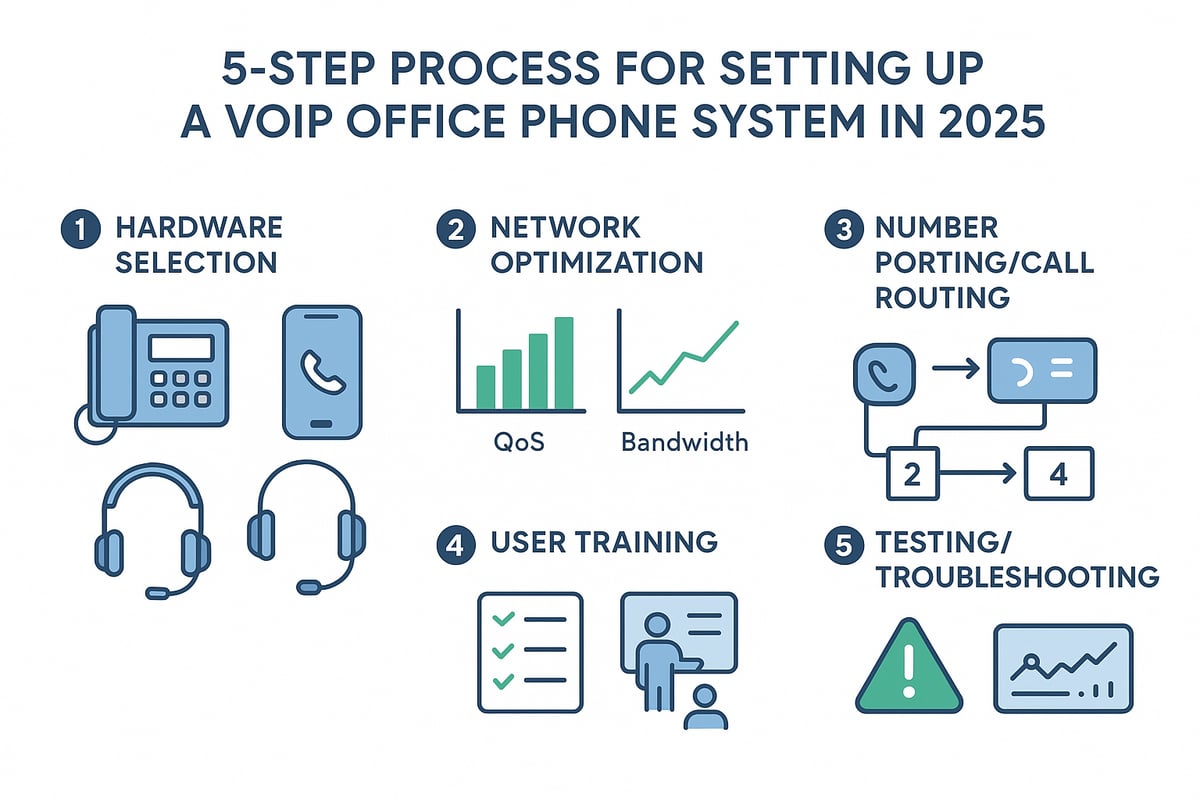
Hardware and Device Selection
Selecting the right hardware for your voip office phone system is foundational. Begin by deciding between IP desk phones, softphones (software-based phones on computers), or mobile apps. Each option offers unique advantages for different work environments.
For hybrid offices, a combination of desk phones for on-site staff and softphones for remote workers ensures flexibility. Don't forget high-quality headsets and conferencing equipment, which are essential for clear, distraction-free communication.
Consider this example setup for a 2025 workplace:
- Desk phones in executive offices
- Softphones for remote tech support teams
- Mobile apps for sales staff on the go
Choose hardware that aligns with your voip office phone provider’s compatibility list and supports future upgrades.
Network Optimization for VoIP
A robust network is critical for voip office phone performance. Start by configuring Quality of Service (QoS) on your routers and switches to prioritize voice traffic over less time-sensitive data.
Wired connections typically offer greater stability and call quality, but modern Wi-Fi 6 networks can also support high-quality calls when optimized. Continuously monitor bandwidth to ensure each call gets at least 100 kbps, and troubleshoot any latency or jitter issues that arise.
A simple QoS configuration might look like this:
voice traffic priority high
bandwidth allocation 100kbps per call
By optimizing your network, you help ensure every voip office phone call is clear and reliable.
Number Porting and Call Routing
Porting your existing business numbers to your new voip office phone system is a crucial step. Start by verifying which numbers you want to retain, then coordinate with your provider to initiate the porting process. This can take anywhere from a few days to a couple of weeks, depending on your current carrier.
Next, design your call routing flows. Use auto-attendants to greet callers and direct them to the right department. For example, a multi-department setup might route calls to sales, support, or HR based on caller input.
A well-structured call routing plan reduces missed calls and improves customer satisfaction. Make sure to test each route thoroughly before going live.
User Training and Onboarding
Effective training accelerates adoption of your voip office phone system. Develop clear training materials, including video tutorials, quick-start guides, and FAQs tailored to your business needs. Schedule live or virtual training sessions for all employees.
Highlight best practices for using desk phones, softphones, and mobile apps. Encourage users to explore features like voicemail-to-email and call forwarding. Provide ongoing support resources, such as an internal helpdesk or online knowledge base.
Consistent training ensures every team member can confidently use your voip office phone, maximizing productivity and minimizing disruptions.
Testing and Troubleshooting
Before fully launching your new voip office phone system, conduct comprehensive testing. Use pre-launch checklists to verify call quality, device compatibility, and call routing accuracy. Simulate high call volumes to identify potential bottlenecks.
Common issues include echo, dropped calls, or registration failures. Troubleshoot by checking network settings, device firmware, and user permissions. Monitor call analytics post-launch to spot trends and resolve issues quickly.
For an added layer of protection, review VoIP Security Best Practices 2025 to ensure your configuration is secure against emerging threats. This proactive approach will help keep your voip office phone system running smoothly and securely.
Step 4: Ensuring Security and Compliance
In 2025, security and compliance are non-negotiable for any voip office phone deployment. As communication threats evolve, businesses must proactively safeguard sensitive data and maintain regulatory standards. This section breaks down the essential steps to keep your voip office phone systems secure, compliant, and resilient.
VoIP Security Threats in 2025
The modern voip office phone landscape faces a range of sophisticated threats. Attackers target voice networks to intercept calls, steal data, or commit fraud. Common risks include:
| Threat | Description | Impact |
|---|---|---|
| Phishing | Social engineering to steal credentials | Account compromise |
| Toll Fraud | Unauthorized use of phone lines | Financial losses |
| Eavesdropping | Intercepting unencrypted calls | Data breaches |
Recent studies show that nearly 30% of businesses experienced some form of VoIP-related security incident last year. As a result, organizations must prioritize threat awareness and invest in secure voip office phone solutions.
Implementing Robust Security Measures
Protecting your voip office phone system starts with proven safeguards. Encryption protocols like SRTP and TLS ensure that conversations and call data remain private. Multi-factor authentication (MFA) prevents unauthorized admin access, making it a vital defense against credential theft. For more on the importance of MFA and other critical steps, see VoIP Security Essentials: Safeguarding Your Communications in 2025.
Key security measures include:
- Encrypted voice and signaling traffic
- MFA for all admin and user accounts
- Regular password updates and access reviews
- Network segmentation for voice traffic
Financial firms and healthcare providers, in particular, should adopt advanced protocols to ensure their voip office phone systems meet industry standards.
Compliance Best Practices
Compliance is essential for any voip office phone deployment, especially in regulated industries. Organizations must follow rules like E911 for emergency calling and adhere to data privacy laws such as GDPR or HIPAA.
Best practices include:
- Recording only where legally allowed and notifying participants
- Storing call data securely with access controls
- Creating clear retention and deletion policies
- Training staff on privacy responsibilities
Regular audits and documentation help demonstrate compliance and protect your business from costly penalties.
Ongoing Monitoring and Updates
Security is never static. Perform regular security audits, update your voip office phone software, and review incident response plans often. Monitoring for suspicious activity lets you respond quickly to new threats and maintain a strong security posture.
Step 5: Integrating VoIP with Business Tools & Future-Proofing
Seamless integration is essential for maximizing the value of your voip office phone system. By connecting your communication platform with business tools, supporting remote teams, and staying ahead of future trends, you ensure your investment delivers long-term results.
Seamless Integration with Business Applications
A voip office phone system becomes a true business asset when it connects seamlessly with the tools your team relies on daily. Integrating with CRM platforms, helpdesk software, and productivity suites streamlines workflows and boosts efficiency.
Common integration options include:
- Automatic call logging in CRM systems
- Click-to-call from email or browser
- Voicemail transcription sent to email
- Real-time call data feeding into analytics dashboards
These integrations empower teams to track interactions, automate follow-ups, and create a unified customer experience. For businesses handling sensitive data, ensure integrations meet compliance requirements and support secure data flows.
Supporting Remote and Hybrid Teams
In 2025, the voip office phone is central to keeping remote and hybrid teams connected. Mobile apps, softphones, and browser-based dialers let employees communicate from anywhere, using any device.
Key features supporting distributed teams:
- Mobile app access for calls, texts, and voicemails
- Video conferencing and instant messaging tools
- Presence indicators and team directories
- Easy device switching for seamless transitions
With these capabilities, your voip office phone system ensures everyone stays in sync, regardless of location. Set up clear usage policies and provide training so remote staff can leverage all available features.
Monitoring, Analytics, and Optimization
Modern voip office phone platforms offer robust analytics and monitoring tools to help you optimize communication performance. Real-time dashboards track key metrics such as call volume, response times, and missed calls.
Analytics benefits include:
- Identifying peak call hours for better staffing
- Spotting dropped call patterns to resolve network issues
- Monitoring agent performance and customer satisfaction
Use these insights to fine-tune call routing, reduce missed opportunities, and control costs. Regularly reviewing analytics ensures your voip office phone system adapts to changing business needs and delivers ROI.
Preparing for Future VoIP Innovations
Staying ahead in communications means future-proofing your voip office phone investment. AI-driven features, such as virtual assistants and predictive call routing, are becoming standard.
Emerging trends to watch:
- AI-powered voice analytics for customer sentiment
- Integration with new channels like SMS and chatbots
- Enhanced security using advanced authentication
For a deeper dive into evolving security threats and solutions, see VoIP Security in 2025: Everything You Need to Know. Regular system reviews and updates ensure your voip office phone platform remains ready for tomorrow’s challenges and opportunities.
VoIP Office Phone Success Stories & Best Practices
Real-world results show how a voip office phone system can transform business communication. Startups often scale quickly, needing tools that support remote teams across time zones. For example, a SaaS startup deployed a voip office phone solution, enabling global expansion without costly hardware. They saw a 50% drop in international calling expenses and improved customer response rates.
Healthcare offices have also benefited. One clinic integrated a voip office phone system with their EMR, streamlining patient calls and appointment reminders. This reduced missed appointments and increased satisfaction scores. These stories highlight the measurable impact of modern phone solutions for diverse industries.
Real-World Case Studies
Companies of all sizes have realized the value of a voip office phone solution. A fast-growing startup with distributed teams used a cloud-based system to connect global staff instantly. This led to seamless collaboration and faster product launches.
In healthcare, a clinic adopted a HIPAA-compliant voip office phone to ensure patient data security and enhance appointment management. As a result, staff productivity increased, and patient satisfaction improved. These case studies underscore how the right phone system supports both innovation and compliance.
Common Pitfalls and How to Avoid Them
Implementing a voip office phone can encounter challenges if not carefully planned. One common mistake is underestimating the bandwidth needed for quality calls. Insufficient staff training can also hinder adoption.
To avoid these pitfalls:
- Assess network capacity before rollout
- Provide comprehensive user training
- Establish clear security protocols
Another issue is neglecting compliance standards. By prioritizing these steps, businesses ensure their voip office phone deployment is smooth and reliable.
Best Practices for Ongoing Success
Long-term success with a voip office phone depends on proactive management. Schedule regular system reviews to identify optimization opportunities. Encourage employee feedback to address workflow gaps.
Leverage vendor support for updates and troubleshooting. For security, implement strong password policies and enable call encryption. Organizations should also monitor for emerging threats and adjust settings as needed, keeping their voip office phone systems secure and efficient.
Industry-Specific Insights
Different sectors have unique requirements for their voip office phone systems. Legal firms prioritize call recording and confidentiality. Healthcare organizations need HIPAA compliant VoIP solutions to protect patient information. Retailers focus on integrating phones with point-of-sale and CRM tools. Finance offices demand advanced encryption and audit trails.
When selecting a voip office phone, match features and compliance options to your industry's needs. This targeted approach maximizes value and minimizes risk.
Frequently Asked Questions (FAQs)
Q: Is a voip office phone reliable for mission-critical calls? A: Yes, with a stable internet connection and proper setup, reliability matches or exceeds traditional systems.
Q: How much can we save by switching to a voip office phone? A: Many businesses report up to 60% savings compared to landlines.
Q: Is it difficult to train staff on a voip office phone? A: Most users adapt quickly, especially with intuitive interfaces and guided onboarding.
Q: Can we integrate a voip office phone with other business tools? A: Yes, leading platforms offer CRM, email, and helpdesk integrations for streamlined workflows.
Resources for Continued Learning
Stay updated on voip office phone advancements by following leading industry blogs, joining webinars, and exploring certification courses. Participate in forums and peer networks to exchange insights.
Recommended resources include:
- Vendor webinars and whitepapers
- Industry-specific user groups
- Online certification programs
Continuous learning ensures your voip office phone strategy remains effective as technology evolves.
Now that you have a clear understanding of the essentials for a successful VoIP office phone setup in 2025 - from planning and provider selection to integration and security - it's the perfect time to put your knowledge into action. With VoIPStore, you gain access to enterprise-grade communication tools, a powerful API, and reliable global coverage designed to help your business thrive. Whether you're a developer or managing a growing team, you can leverage real-time analytics and dedicated support to ensure seamless connectivity worldwide. Ready to elevate your business communications and stay ahead in the digital landscape?
Start now!
Ready to receive a verification code on a real mobile number?
Browse services