The Essential Mitel VoIP Guide for 2025 Beginners
New to Mitel VoIP Discover a step by step guide to setup features and security Learn how to optimize business communications and future proof your system
Iacopo Bonandi, Founder & CEO
November 16, 2025Are you overwhelmed by the ever-evolving world of business communications? You are not alone. As companies prepare for 2025, mitel voip emerges as a game-changer, promising simplicity and efficiency in one package.
This guide demystifies mitel voip for beginners, providing a clear, step-by-step approach to understanding, selecting, and implementing the right solution for your business needs.
You will explore what VoIP is, why Mitel leads the market, how to set up your system, optimize its usage, and future-proof your company’s communications. Ready to transform how your business connects? Let’s get started.
Understanding VoIP and the Mitel Advantage
Voice over Internet Protocol, or VoIP, has changed the way businesses communicate. Instead of relying on traditional phone lines, VoIP uses the internet to transmit calls. This switch brings significant benefits, including cost savings, increased flexibility, and easy scalability for growing organizations. Companies now use VoIP to connect remote teams, streamline customer support, and enable global collaboration. With the VoIP market projected to reach $102 billion by 2026, more businesses are adopting this technology to stay ahead. The rise of VoIP is especially apparent in modern workplaces where adaptability is crucial.

What is VoIP?
VoIP transforms voice communication by sending audio as digital data over the internet. Unlike legacy phone systems that depend on physical wires and hardware, VoIP enables calls from anywhere with an internet connection. This technology reduces infrastructure costs and makes it easier for companies to expand or support remote workforces. Key advantages of VoIP include:
- Lower operational costs compared to traditional PBX systems
- Flexibility to work from any location
- Scalability to add or remove users as needed
VoIP is now common for businesses of all sizes, especially for those supporting hybrid teams. Mitel VoIP leverages these benefits to deliver modern, reliable communication solutions.
Why Choose Mitel for VoIP?
Mitel VoIP stands out in the telecom industry due to over 50 years of innovation. Mitel serves more than 70 million users in over 100 countries and focuses on unified communications and cloud-first strategies. Their reputation is built on reliability, security, and a robust feature set tailored for business needs. According to industry reports, Mitel consistently achieves high customer satisfaction ratings, particularly for its dependable service and responsive support. With a commitment to ongoing development, Mitel VoIP empowers organizations to communicate efficiently and securely, regardless of size or sector.
Core Features of Mitel VoIP
Mitel VoIP delivers a comprehensive suite of features designed to enhance productivity and collaboration. Key offerings include:
- Cloud PBX for streamlined call management
- Mobile integration for on-the-go access
- Unified messaging for emails, voicemails, and texts in one inbox
- Advanced call routing and conferencing tools
- Seamless CRM and productivity platform integration
- Robust security protocols and compliance certifications
- Analytics and reporting for actionable business insights
These features enable teams to work smarter, not harder. Mitel VoIP ensures businesses remain agile and connected in a fast-paced digital environment.
Mitel VoIP vs. Competitors
When comparing Mitel VoIP to other leading providers like RingCentral, Cisco, and 8x8, several differences emerge. Pricing models and contract flexibility are strong points for Mitel, as are its depth of features and customization options. Customer support is another area where Mitel excels, with faster response times and higher satisfaction scores. The table below summarizes key points:
| Provider | Customization | Support | Pricing Flexibility | Feature Depth |
|---|---|---|---|---|
| Mitel VoIP | High | Excellent | Flexible | Extensive |
| RingCentral | Medium | Good | Moderate | High |
| Cisco | High | Good | Rigid | High |
| 8x8 | Medium | Fair | Flexible | Moderate |
For more context on how Mitel compares to other top services, see our Best VoIP phone service options guide.
Who Should Use Mitel VoIP?
Mitel VoIP is a smart choice for a wide range of businesses. Small companies benefit from its affordability and ease of setup, while large enterprises appreciate its scalability and advanced features. Sectors such as healthcare, education, finance, and retail rely on Mitel VoIP for secure and reliable communication. Whether supporting a startup or a multinational corporation, Mitel VoIP adapts to changing business needs. Real-world case studies show successful deployments in both remote and hybrid team environments, highlighting Mitel’s flexibility and broad industry appeal.
Setting Up Your Mitel VoIP System: Step-by-Step for Beginners
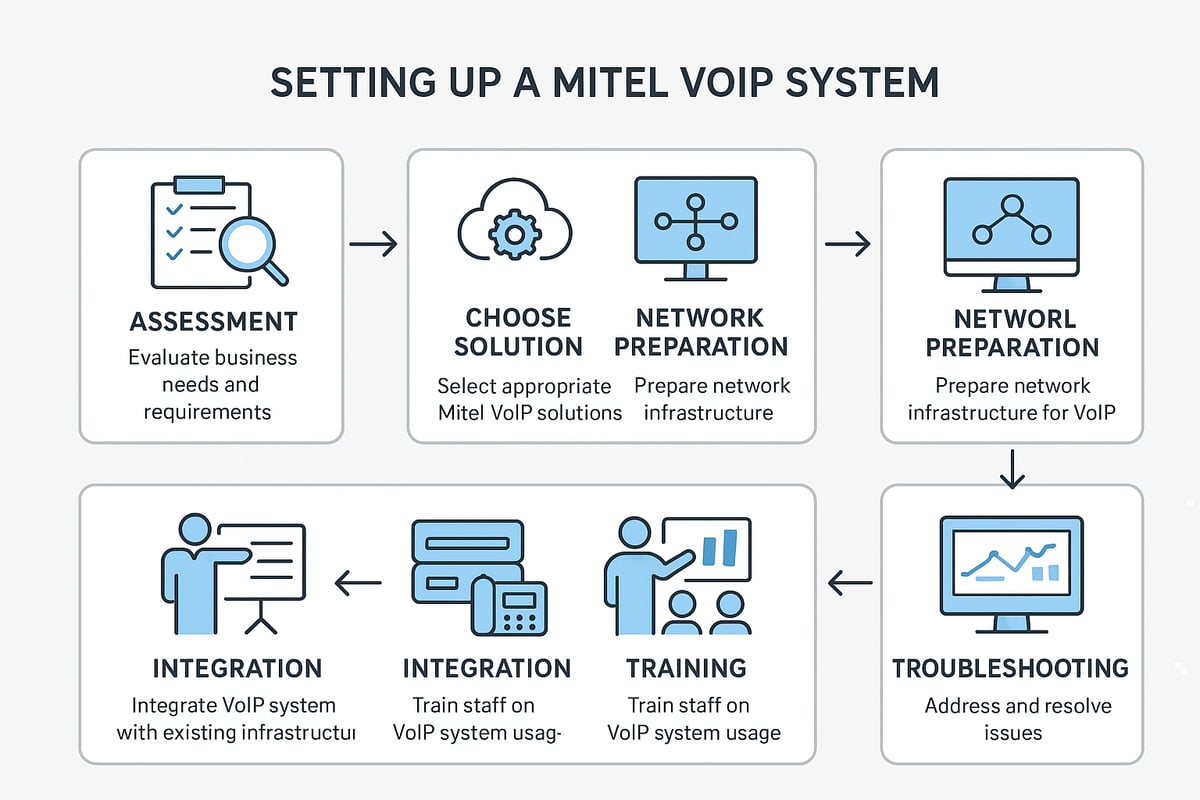
Embarking on your mitel voip journey can seem daunting, but breaking it down into manageable steps makes the process straightforward. This section guides you through assessing your needs, selecting the best solution, preparing your infrastructure, and ensuring a smooth rollout for your business.
Assessing Your Business Communication Needs
Start by evaluating your organization's specific requirements for mitel voip. Consider how many calls your team handles daily, the number of employees who need access, and whether remote work is common.
List out essential features such as voicemail, interactive voice response (IVR), or call recording. For hybrid or remote teams, mobility and collaboration tools are crucial.
Budget planning is essential. Estimate how mitel voip can reduce costs compared to legacy systems. For instance, a small business may prioritize affordability and essential features, while an enterprise might need advanced analytics and integration with multiple locations.
Choosing the Right Mitel VoIP Solution
Selecting the correct mitel voip product line is vital for your success. Explore options like MiCloud Connect for cloud deployments, MiVoice Business for on-premises setups, or MiTeam Meetings for collaboration.
Decide between cloud and on-site installation based on your IT resources and security requirements. Review licensing models - subscription offers flexibility, while perpetual licenses may suit stable environments.
Consult with a mitel voip vendor for product demonstrations and integration advice. Always consider scalability, security, and compatibility with existing software when making your decision.
Preparing Your Network and Infrastructure
Proper network preparation is fundamental to mitel voip performance. Ensure your internet connection provides at least 100kbps per call to support high-quality audio.
Configure your router and firewall to prioritize VoIP traffic using Quality of Service (QoS) settings. Acquire necessary hardware, including IP phones, headsets, and conferencing devices.
Monitor network health to prevent issues like jitter, latency, or packet loss. Address these proactively to avoid disruptions. A well-prepared infrastructure lays the groundwork for reliable mitel voip communications.
Installation and Initial Setup
Begin mitel voip installation by following the vendor’s step-by-step instructions for your chosen solution. Register all user devices on the platform and assign extensions as needed.
Configure auto-attendants and call flows to streamline inbound calls. Test call quality and system stability before launch. For a 20-person office, setup can typically be completed within a few days, depending on complexity.
For additional guidance on integrating VoIP phones with your office setup, refer to this detailed VoIP phone system integration resource.
Integrating with Other Business Tools
One of mitel voip's strengths is its ability to integrate with business applications. Connect your CRM, such as Salesforce or Microsoft Dynamics, to enable click-to-dial and automatic call logging.
Sync calendars for seamless meeting scheduling and leverage APIs to automate workflows or customize features.
Prioritize security during integration by following best practices, ensuring sensitive data is protected. Well-executed integrations drive productivity and enhance the value of your mitel voip investment.
Training Your Team and Launching the System
Effective adoption of mitel voip requires comprehensive team training. Utilize onboarding resources, including tutorials, webinars, and official documentation.
Set up user accounts with appropriate permissions and conduct live training sessions to address common questions. Establish clear support channels for ongoing troubleshooting and feedback.
Monitor user engagement with mitel voip, measure adoption rates, and gather input for continuous improvement. Well-prepared teams unlock the full benefits of your new system.
Troubleshooting Common Setup Issues
Even with careful planning, mitel voip deployments may encounter challenges. Common issues include echo, dropped calls, or static. Diagnose these by checking network stability, device settings, and software versions.
Leverage Mitel’s support resources and user forums for solutions. Regularly update firmware and software to address bugs and security vulnerabilities.
If issues persist, escalate to your vendor or Mitel partner for advanced troubleshooting. Proactive maintenance and swift response ensure your mitel voip system runs smoothly from day one.
Essential Mitel VoIP Features Every Beginner Should Know
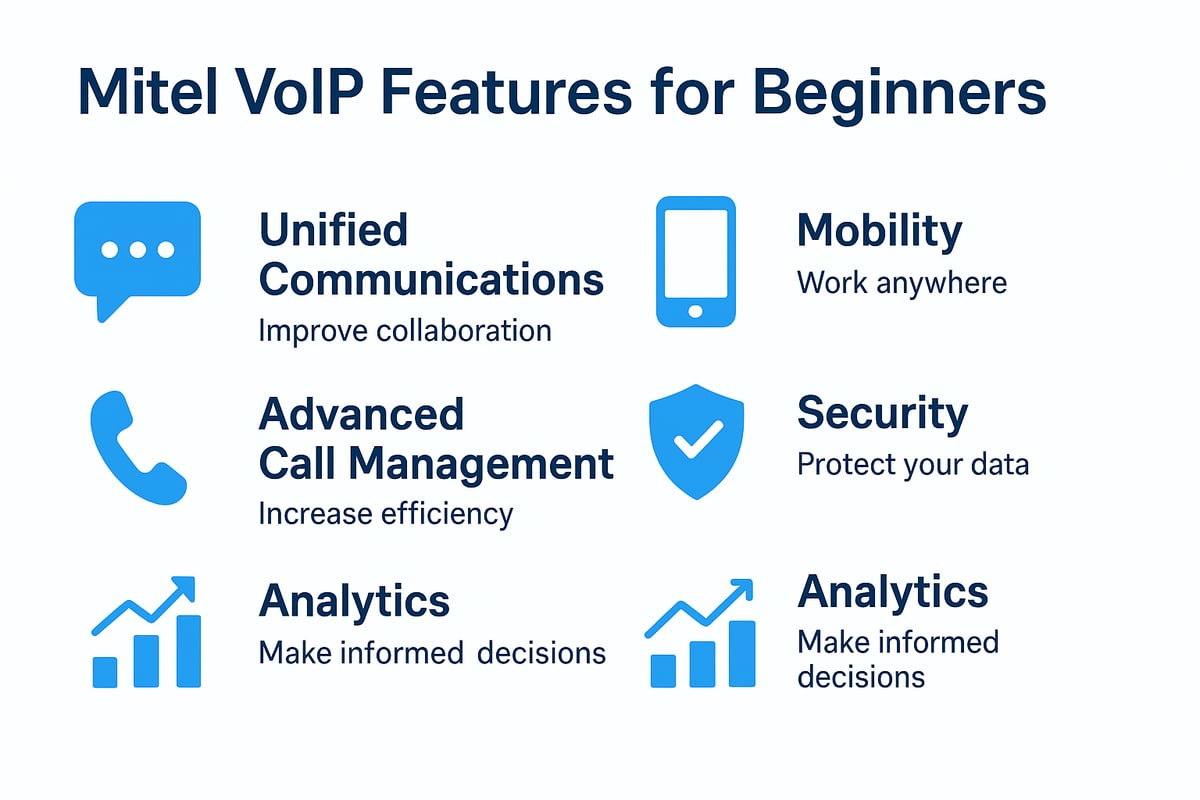
Unlocking the full potential of mitel voip starts with understanding its most valuable features. For beginners, getting familiar with these essentials will help you maximize efficiency, collaboration, and security from day one.
Unified Communications and Collaboration Tools
Mitel voip empowers teams with unified communications, bringing together messaging, video conferencing, and file sharing in one platform. Presence indicators display real-time availability, making it easy to know who is online or in a meeting.
Calendar integration lets users schedule calls and video meetings with a single click. Team messaging and instant file sharing improve project coordination, even for remote staff.
For example, a distributed sales team can hold daily video standups, share updates instantly, and collaborate on documents without switching apps. This seamless experience is a hallmark of mitel voip for modern businesses.
Mobility and Remote Work Features
Mitel voip supports today’s mobile workforce with robust remote access tools. Dedicated mobile apps for iOS and Android allow employees to make and receive business calls from anywhere.
Softphone capabilities turn laptops and tablets into full-featured business phones. Secure connections, including VPN and encrypted calls, keep conversations private even offsite.
Features like hot desking and device handoff let users move calls between devices without interruption. Organizations can support distributed teams easily, ensuring everyone stays connected with mitel voip no matter where they work.
Advanced Call Management
Advanced call management is central to mitel voip. Features include intelligent call forwarding, routing, and the ability to set up hunt groups for efficient team response.
Interactive Voice Response (IVR) and auto-attendants streamline customer navigation. Call recording supports compliance and quality assurance, while voicemail-to-email and transcription services improve accessibility.
For deeper insights into PBX and call management, see this VoIP PBX system fundamentals guide. With these tools, mitel voip helps businesses deliver exceptional customer support and operational efficiency.
Security and Compliance
Security is a top priority in mitel voip deployments. End-to-end encryption using protocols like TLS and SRTP protects voice data in transit. Role-based access controls ensure only authorized users can access sensitive features.
Mitel voip systems meet important compliance standards such as GDPR, HIPAA, and PCI, making them suitable for regulated industries. Fraud prevention tools and real-time monitoring help detect suspicious activity.
Industry benchmarks consistently rate mitel voip high for security, providing peace of mind to organizations handling sensitive communications and customer data.
Analytics and Reporting
Mitel voip delivers powerful analytics and reporting features to help organizations optimize communication. Real-time dashboards track call volume, duration, and quality metrics.
Customizable reports provide management with actionable insights on team performance and call trends. Integration with business intelligence platforms allows further data analysis.
For example, a call center manager can use mitel voip analytics to identify peak call times and adjust staffing accordingly. These insights drive better decision-making and ensure resources are used efficiently.
Optimizing and Maintaining Your Mitel VoIP System
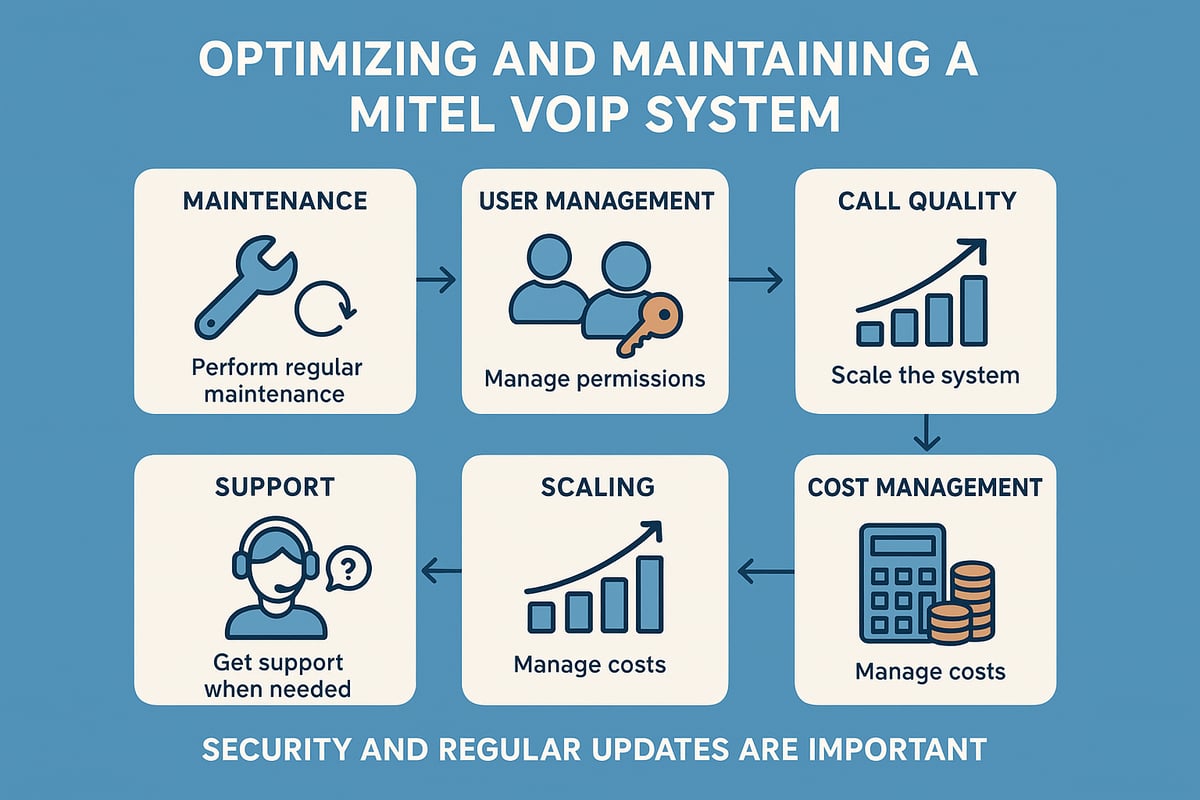
Keeping your mitel voip system optimized is essential for reliable business communication. By following a structured approach to maintenance, user management, and scaling, you can ensure your system delivers maximum value. Let’s break down the key strategies every organization should follow.
Regular System Maintenance Best Practices
Routine maintenance is the foundation of a healthy mitel voip deployment. Start by scheduling regular firmware and software updates for all devices and servers. This keeps your system secure and compatible with the latest features.
Backups are crucial. Establish automated backup routines for configuration and call data. Prepare a disaster recovery plan to restore service rapidly in case of unexpected failures.
Monitor system health using built-in dashboards and diagnostic tools. Create a maintenance checklist covering updates, backups, and hardware inspections. For detailed guidance on protecting your system, review these VoIP security protocols and compliance recommendations.
Preventative care reduces downtime, especially during critical business periods.
Managing Users and Permissions
Proper user management ensures only authorized personnel access your mitel voip system. Add, remove, or update user accounts as staff join or leave the organization. Assign appropriate roles and permission levels to match each employee’s responsibilities.
Monitor user activity logs for unusual patterns that might indicate security issues. When onboarding or offboarding employees, follow a documented process to avoid gaps in access control.
For larger organizations, group users by departments or teams to streamline permission assignments. This proactive approach protects sensitive data and supports operational efficiency across your mitel voip deployment.
Ensuring Call Quality and Reliability
Call quality is a key performance metric for any mitel voip system. Begin by monitoring network performance for latency, jitter, and packet loss. Use Mitel’s diagnostic tools to identify and resolve issues quickly.
Implement redundancy with backup servers and failover internet connections. This helps maintain uptime if hardware or ISP problems occur. Adhere to industry standards, aiming for at least 99.99 percent service level agreements.
External factors like power outages or hardware failures can impact reliability. By proactively optimizing network settings and infrastructure, you can ensure consistent call clarity with mitel voip.
Scaling Your Mitel VoIP System
Growth is a sign of success, and mitel voip makes scaling straightforward. When adding users, locations, or devices, start by evaluating current licenses and hardware capacity. Upgrade your licensing plan as needed to unlock more features.
Plan for business growth or seasonal spikes by mapping out expansion needs in advance. Use the system’s management portal to add extensions or users with minimal disruption.
Avoid common scaling issues by testing new configurations in a controlled environment before wide deployment. With mitel voip, organizations can scale from 10 to 100 users seamlessly.
Leveraging Support and Community Resources
Even with the best setup, questions or issues may arise. Mitel provides comprehensive technical support, a knowledge base, and active user forums for mitel voip customers. Tap into training and certification programs to keep your team’s skills sharp.
Engage with online communities for peer advice and troubleshooting. When facing complex integration or deployment challenges, escalate cases to certified Mitel partners.
Many organizations have resolved integration issues quickly by leveraging community expertise and official mitel voip resources.
Cost Management and ROI Optimization
Controlling costs is essential for any mitel voip investment. Regularly monitor usage reports to identify unnecessary features or unused licenses. Work with your vendor to negotiate better rates or bundle services based on actual needs.
Calculate return on investment by factoring in productivity gains, reduced downtime, and lower traditional telephony costs. Use customizable reports to track savings over time.
A well-managed mitel voip system can deliver significant cost reductions and measurable business benefits within months of deployment.
Future-Proofing Your Mitel VoIP Investment for 2025 and Beyond
Staying ahead in business communications requires more than just deploying a robust system today. To ensure your mitel voip solution remains a strategic asset, it is essential to anticipate industry shifts, adopt new technologies, and protect your investment for years to come.
Embracing Emerging VoIP Trends
The next wave of innovation is transforming mitel voip into more than just a calling platform. Artificial intelligence is powering voice assistants and automating call routing, saving time and improving customer satisfaction. Integration with IoT and smart office devices is enabling smarter workspaces, while the rollout of 5G is set to boost call quality and network reliability.
For perspective, the VoIP market is projected to reach $102.5 billion by 2026, highlighting the rapid pace of adoption. By staying informed and embracing these trends, you ensure your mitel voip system remains competitive.
Cloud Migration and Hybrid Deployments
Migrating mitel voip to the cloud offers flexibility, scalability, and simplified management. Businesses benefit from reduced hardware costs, automatic updates, and easier remote access. Hybrid deployments allow organizations to transition gradually, combining on-premises reliability with cloud agility.
When planning a migration, evaluate security standards and compliance requirements. Successful transitions often include phased rollouts and staff training. This approach ensures your mitel voip investment adapts to future business needs.
Integrating Unified Communications as a Service (UCaaS)
UCaaS brings together voice, video, messaging, and collaboration into a single platform. Mitel voip supports UCaaS adoption, empowering teams to communicate seamlessly across channels. This integration is especially valuable for global teams and remote workforces.
Key advantages include simplified IT management, improved user experience, and consistent updates. With mitel voip as your foundation, adopting UCaaS positions your business for long-term digital transformation.
Planning for Business Continuity and Disaster Recovery
Uninterrupted communication is critical. Future-proofing mitel voip means preparing for unexpected events, from power outages to cyber incidents. Establish redundant systems, cloud backups, and geo-redundancy to minimize downtime.
Implement emergency call routing and automated notifications for crisis situations. Review and test disaster recovery plans regularly. These steps protect your mitel voip system and ensure your business can respond quickly to disruptions.
Keeping Up with Security Threats
VoIP-specific threats like phishing, toll fraud, and DDoS attacks are evolving. Mitel voip incorporates advanced security protocols, including end-to-end encryption and regular security updates. Training employees to recognize social engineering tactics is equally important.
Monitor industry trends and leverage Mitel’s security roadmap for proactive defense. Staying vigilant helps safeguard your mitel voip communications and maintains compliance with regulations.
Evaluating and Upgrading Your System
Continuous improvement is key to future-proofing mitel voip. Schedule regular system audits to assess performance, review feature usage, and identify areas for enhancement. Stay current with software and hardware updates to support new business requirements.
Plan for the integration of emerging technologies and remote work trends. By evaluating and upgrading your mitel voip system, you maximize ROI and maintain a competitive edge.
Resources and Further Learning
Continued success with mitel voip depends on staying informed and expanding your knowledge base. Here are essential resources to help you advance:
- Official Documentation: Access Mitel’s support portal for user guides, FAQs, and troubleshooting resources.
- Training and Certifications: Explore Mitel’s training programs to build expertise and earn certifications.
- Industry Insights: Join webinars, read leading VoIP blogs, and participate in forums to keep up with best practices.
- Comparison Tools: Use comparison charts and buyer’s guides to evaluate mitel voip against other providers.
- Consultant Connections: Reach out to certified Mitel partners for personalized advice and implementation support.
Invest time in these resources to make the most of your mitel voip journey.
As you’ve explored the fundamentals of Mitel VoIP and how it can transform your business communications in 2025, you’re already on the right path to simplifying how your team connects and collaborates. Whether you’re optimizing for reliability, global reach, or seamless integration with tools you already use, taking the next step is easier than you might think. If you’re ready to put what you’ve learned into action and experience enterprise-grade solutions firsthand, you can start your journey today. Log in and get started - your smarter, more connected business awaits.
Start now!
Ready to receive a verification code on a real mobile number?
Browse services