Grandstream VoIP Phones Guide: Essential Tips for 2025
Discover expert tips on Grandstream VoIP phones for 2025. Learn to choose, deploy, and optimize top models with security and future-proof strategies for your
Iacopo Bonandi, Founder & CEO
October 30, 2025Business communications are undergoing a rapid transformation as technology continues to advance. In 2025, VoIP stands at the heart of this evolution, enabling organizations to collaborate, connect, and grow with unprecedented flexibility. Among the industry’s leaders, Grandstream has earned a reputation for delivering innovative solutions that power businesses worldwide.
This comprehensive guide on grandstream voip phones provides essential tips, expert insights, and the latest trends to help you make informed decisions. You will learn how to choose the right devices, deploy them efficiently, and optimize your communications for ongoing success.
Discover an overview of Grandstream’s VoIP ecosystem, explore top models tailored to your needs, and uncover best practices for setup, security, integration, and future-proofing. Ready to unlock the full potential of your business communications? Let’s get started.
Understanding Grandstream VoIP Phones in 2025
Staying ahead in business communications means choosing solutions that combine innovation, reliability, and adaptability. Grandstream voip phones have become a cornerstone for organizations worldwide, offering a powerful blend of advanced technology and practical value. In 2025, understanding what sets these phones apart is essential for any business aiming to future-proof its communications.
What Makes Grandstream a Top Choice?
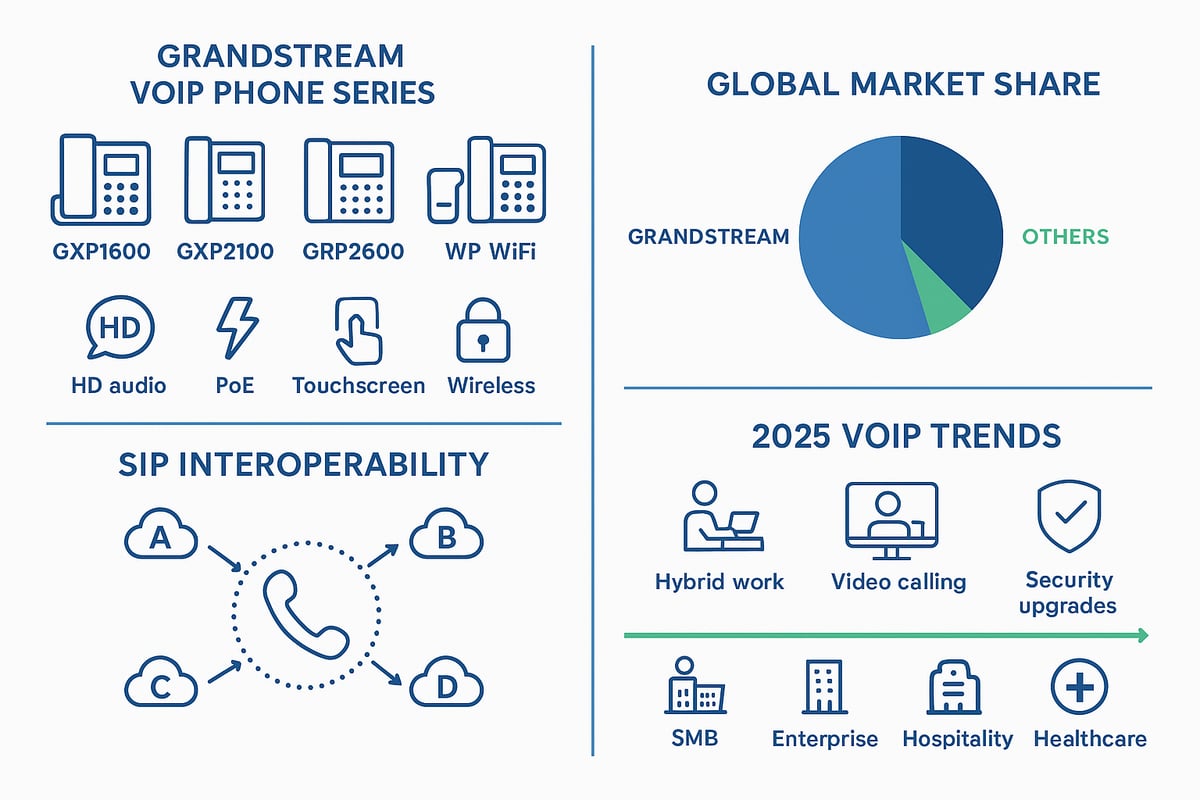
Grandstream voip phones have earned a reputation for exceptional value, robust reliability, and seamless interoperability. These devices are compatible with most SIP-based platforms, ensuring smooth integration with leading VoIP providers. Businesses appreciate their consistently strong audio and video quality, which is vital for clear communication across teams and clients.
Grandstream voip phones deliver advanced telephony features without compromising affordability, making them attractive for both SMBs and large enterprises. Recent statistics reveal a steady increase in global market share, with more organizations selecting Grandstream for their communication infrastructure in 2025.
Key Features and Technologies in the Latest Models
The latest grandstream voip phones come packed with features tailored for modern business needs. Power over Ethernet (PoE) simplifies installations, while HD audio ensures crystal-clear voice calls. Multi-line support, touchscreen interfaces, and customizable function keys streamline daily operations.
Integration with real-time web applications and automated phonebook sync boosts productivity for busy teams. Enhanced security protocols and regular firmware updates protect systems from emerging threats. For example, the GRP2600 Series and WP WiFi Phones offer advanced wireless, security, and usability features that set a new benchmark for business communication devices.
Grandstream’s Product Lineup Overview
Grandstream voip phones are organized into several product families, each designed for specific business scenarios. Here’s a quick overview:
| Series | Ideal For | Key Features |
|---|---|---|
| GXP1600 | SMBs, Front Desk | Basic HD phones, 2-3 lines |
| GXP2100 | Professionals | Large displays, up to 6 lines |
| GRP2600 | Enterprise | Touchscreens, advanced security |
| WP WiFi | Mobile Workers | Wireless, roaming, rugged design |
| DECT | Warehouses, Retail | Cordless, multi-handset support |
| GHP Hotel | Hospitality | Compact, guest room features |
Specialized models support sectors like hospitality and healthcare. Grandstream voip phones evolve regularly, so businesses should check for upcoming models and end-of-life notices to stay current.
Interoperability and Open Standards
A major advantage of grandstream voip phones is their commitment to open standards, especially SIP protocol support. This ensures compatibility in multi-vendor environments and makes future scaling straightforward. Grandstream partners with major VoIP service providers, enabling seamless integration with platforms such as 3CX, FreePBX, and Asterisk.
For a deeper dive into how these phones fit into different VoIP systems, see the VoIP Compatible Phone Guide. This flexibility helps businesses protect their investments and adapt as technology evolves.
2025 Trends Impacting VoIP Phone Selection
The landscape for grandstream voip phones in 2025 is shaped by several key trends. Hybrid and remote work continue to drive demand for mobile and wireless VoIP solutions. Organizations are seeking video-enabled desk phones and robust wireless options for flexible deployments.
Security and user experience remain top priorities, as does integration with unified communications platforms. Industry projections show ongoing growth in VoIP adoption, with feature-rich, secure, and adaptable grandstream voip phones leading the way for businesses focused on future readiness.
Choosing the Right Grandstream VoIP Phone for Your Business
Selecting the ideal grandstream voip phones for your organization is a strategic decision that impacts productivity, user satisfaction, and long-term growth. With a broad portfolio, Grandstream offers solutions tailored to various business needs, budgets, and technical environments. This section breaks down the critical factors to consider, equipping you to make an informed choice for 2025.
Assessing Business Communication Needs
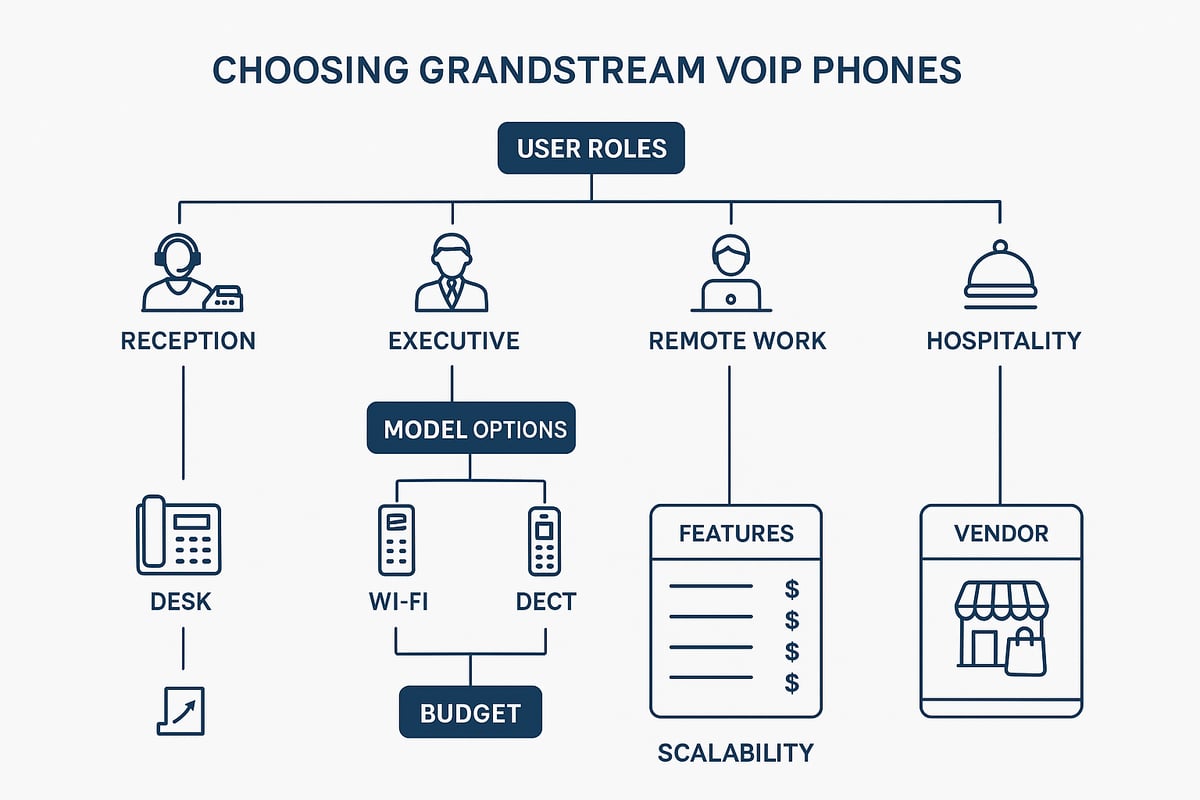
Understanding your unique business requirements is the first step in selecting grandstream voip phones. Start by analyzing user roles, such as receptionists who require multi-line support and executives who may benefit from advanced features.
Consider:
- Call volume and peak usage times
- Mobility requirements for staff on the move
- Collaboration needs, including conferencing and directory access
Match device types to workflows. Desk phones suit fixed office roles, while WiFi and DECT models provide flexibility for remote or mobile employees. For example, a receptionist needs a multi-line model with BLF keys, while a remote worker may prefer a wireless option for home or coworking spaces.
Comparison of Popular Grandstream Models
Grandstream voip phones include several series, each addressing different business scenarios. Here is a quick comparison:
| Model Series | Display Type | Line Support | Connectivity | Expansion Options |
|---|---|---|---|---|
| GXP1600 | LCD | 1-3 lines | Ethernet | Basic |
| GXP2100 | Color LCD | 4-6 lines | Gigabit | Expansion module |
| GRP2600 | Touchscreen | 3-12 lines | PoE, Gigabit | Advanced |
| WP8xx WiFi | LCD | 2-4 lines | WiFi | Mobility |
GXP1600 fits small offices or retail, GXP2100 is ideal for front desks, GRP2600 suits executives and managers, while WP8xx WiFi delivers untethered communication for dynamic environments. Compare these with competing brands to ensure the right fit by business size and expected growth.
Specialized Solutions: DECT, WiFi, and Hotel Phones
For organizations needing flexible deployments, grandstream voip phones offer DECT cordless and WiFi models. DECT phones are perfect for warehouses or large retail spaces, supporting seamless roaming and long battery life. WiFi phones enable cable-free installations in offices and healthcare settings, reducing infrastructure costs.
The GHP Hotel Series addresses hospitality needs with easy guest room management and integration. Real-world use cases include hotels providing in-room calling, warehouses equipping staff with DECT handsets, and healthcare facilities leveraging wireless models for nurse mobility.
To explore more about these wireless options, see Wireless VoIP Phone Options for detailed comparisons and deployment tips.
Budgeting and Total Cost of Ownership
Grandstream voip phones are recognized for affordability, making them a cost-effective choice. When budgeting, consider:
- Hardware purchase price
- Licensing and software subscriptions
- Maintenance and support contracts
- Upgrade and replacement cycles
PoE support reduces energy costs by eliminating power adapters, and efficient designs lower long-term electricity consumption. On average, businesses report significant savings with Grandstream compared to other VoIP brands, especially when deploying at scale.
Scalability and Future-Proofing
As your business evolves, your grandstream voip phones should adapt seamlessly. Choose models with robust firmware support and backward compatibility to ensure longevity. Look for phones that integrate with cloud PBX solutions and hybrid environments, supporting both on-premise and remote users.
Future-proofing tips:
- Select devices with ample line support for future expansion
- Ensure compatibility with unified communications platforms
- Prioritize models receiving regular software updates
This proactive approach safeguards your investment and accommodates new features as they emerge.
Sourcing and Vendor Considerations
To maximize the value of your grandstream voip phones, purchase from authorized resellers who offer genuine warranties and reliable support. Evaluate vendors based on:
- Technical support responsiveness
- Provisioning and configuration services
- After-sales assistance and RMA processes
Many providers offer demo programs or discounts for bulk purchases. For example, VoIPSupply.com is a leading distributor trusted by businesses for sourcing Grandstream devices, ensuring a smooth procurement and deployment experience.
Step-by-Step Guide to Setting Up Grandstream VoIP Phones
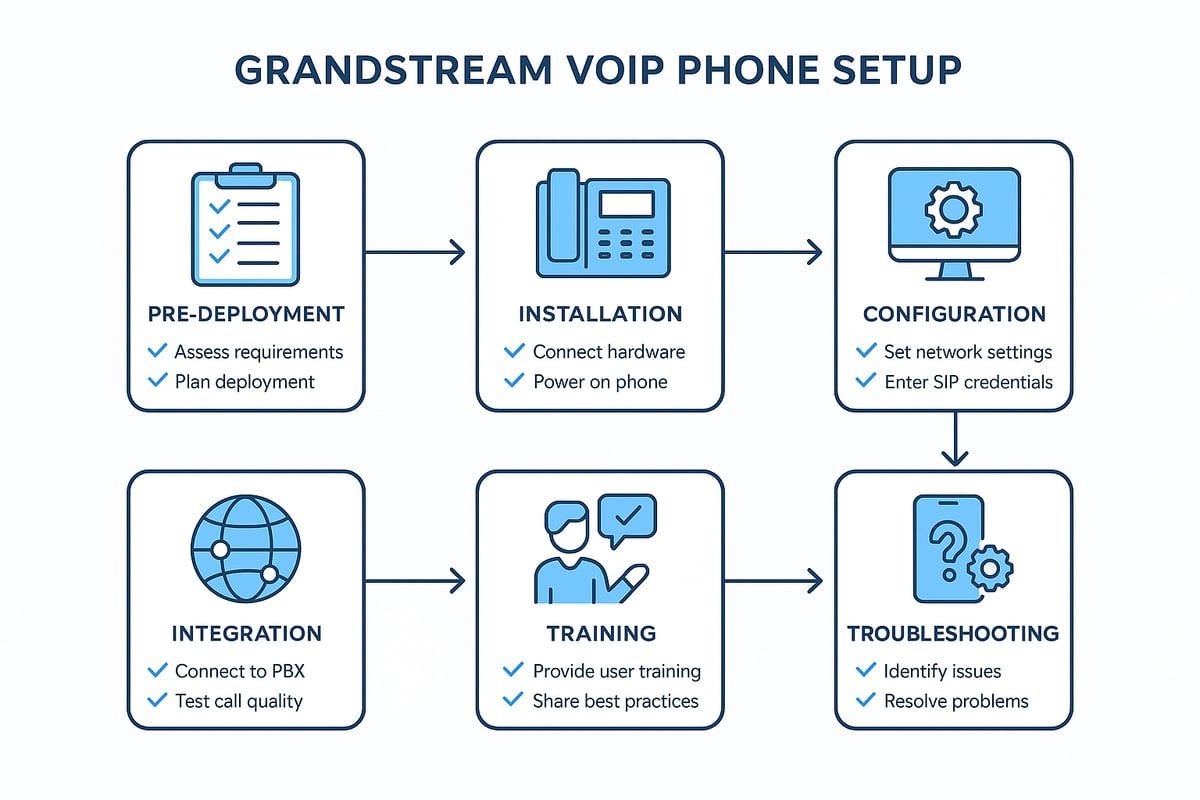
Setting up grandstream voip phones for your business ensures reliable communications and a smooth user experience. Follow this step-by-step guide to prepare, install, configure, and optimize your devices for peak performance in 2025.
Pre-Deployment Checklist
Before installing grandstream voip phones, review your network infrastructure. Ensure sufficient bandwidth for simultaneous calls, and verify that PoE switches are available if you plan to power devices via Ethernet. Segment voice traffic with VLANs and configure Quality of Service (QoS) to prioritize calls.
Check compatibility with your VoIP service or PBX. Set up SIP trunks and confirm all credentials. Organize an inventory of devices, labeling each unit for easier deployment and tracking. Prepare user documentation and plan training sessions to support adoption. Addressing these steps upfront minimizes disruptions and ensures a successful rollout.
Unboxing and Physical Installation
Begin by carefully unboxing your grandstream voip phones. Attach the handset, connect the stand, and plug in the Ethernet cable. If using PoE, the phone powers up automatically; otherwise, connect the power adapter. Select a mounting option that fits your workspace, such as desktop placement, wall mounting, or shared stations.
For specialized environments like warehouses, consider models such as the WP825 WiFi phone. Ensure strong WiFi coverage and correct placement for optimal performance. Double-check all connections before powering on, and confirm that indicator lights show proper network activity. Physical setup is the foundation for seamless phone operation.
Initial Configuration and Provisioning
Access the phone’s web interface using its IP address, entering default credentials to log in. Grandstream voip phones support both manual and auto-provisioning, enabling fast deployment at scale. Import your company phonebook and pre-program speed dials for key contacts.
Regularly update firmware to unlock new features and enhance security. For more information on SIP configuration basics, see SIP Phone System Basics. Well-configured devices reduce support tickets and ensure users have access to all necessary functions from day one.
Integrating with Your VoIP System
Register your grandstream voip phones with your PBX or hosted VoIP provider. Enter SIP account details, assign extensions, and define user profiles. Configure call routing rules, voicemail, and advanced features to match business workflows.
Integration with platforms like 3CX or FreePBX is straightforward due to Grandstream’s standards-based approach. Test inbound and outbound calls to verify connectivity. Document the integration steps for future reference, ensuring consistent setup across all devices and locations.
User Training and Adoption
Successful deployment of grandstream voip phones relies on effective user training. Provide quick start guides, video tutorials, and live demonstrations to familiarize staff with new devices. Customize layouts and function keys to support individual workflows.
Encourage feedback and address common questions, such as call transfer or voicemail setup. Track user adoption metrics and satisfaction levels to identify areas for improvement. Comprehensive training accelerates productivity gains and maximizes the return on your investment.
Troubleshooting Common Setup Issues
If issues arise with grandstream voip phones, start by checking network connectivity and registration status. Common problems include incorrect SIP credentials, network misconfigurations, or firmware mismatches. For audio issues, investigate jitter, latency, and echo sources within your LAN.
Resolve provisioning errors by verifying server addresses and credentials. Regularly consult Grandstream’s forums and your vendor’s helpdesk for support resources. Proactive troubleshooting ensures ongoing call quality and reduces downtime, keeping communications running smoothly.
Optimizing Grandstream VoIP Phones for Performance and Security
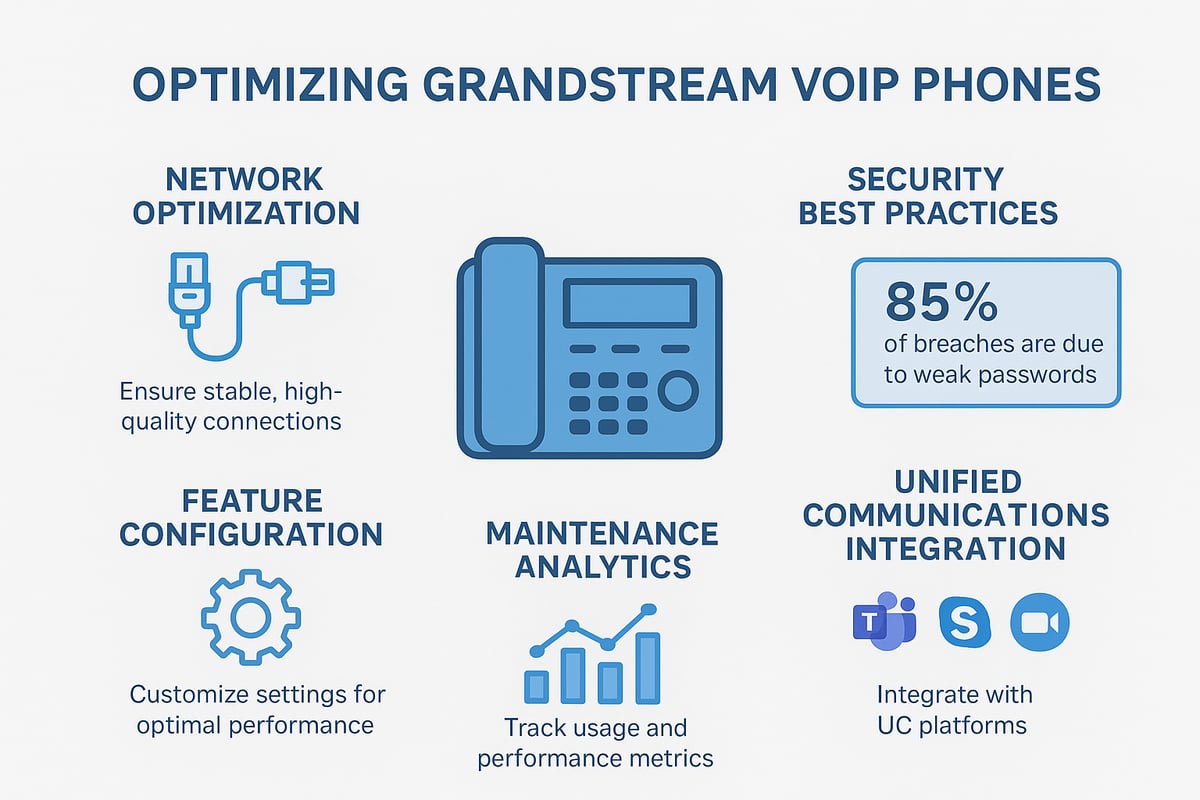
Optimizing grandstream voip phones for both performance and security is crucial as your business communication needs grow in 2025. With evolving technology and increased remote work, maintaining high call quality and robust protection helps ensure reliable connections and data privacy. This section outlines actionable strategies to help you get the most out of your grandstream voip phones, from network tuning to advanced integrations.
Network Optimization for VoIP Quality
The foundation of reliable grandstream voip phones lies in a well-optimized network. Prioritize Quality of Service (QoS) settings to ensure voice traffic takes precedence over other data streams. This minimizes latency and jitter, two common culprits of poor audio quality.
Segment your voice and data traffic using VLANs to reduce congestion and interference. Regularly monitor bandwidth usage to prevent packet loss, especially during peak business hours. In high-traffic environments, consider deploying PoE switches for consistent power and connectivity.
- Enable QoS on all network hardware
- Separate voice and data with VLANs
- Monitor and address bandwidth bottlenecks
A proactive approach to network management will keep grandstream voip phones delivering clear, uninterrupted calls.
Security Best Practices for 2025
Securing grandstream voip phones is non-negotiable as threats to VoIP systems continue to rise. Always enable encryption protocols such as TLS and SRTP for both voice and signaling. Consistent firmware updates are essential to patch vulnerabilities and maintain compliance.
Implement strong password policies for all endpoints, and disable unused services to reduce attack surfaces. The financial impact of VoIP data breaches is increasing, making security a top priority. For more on current VoIP security issues and strategies, see VoIP Security Trends.
- Use encryption for all call traffic
- Schedule regular firmware updates
- Enforce complex passwords and limit open ports
By following these practices, your grandstream voip phones remain protected against emerging threats.
Advanced Feature Configuration
Unlock the full potential of grandstream voip phones by configuring advanced features tailored to your workflow. Busy Lamp Field (BLF) keys help manage call flow in busy offices, while call forwarding and conferencing streamline team collaboration.
Integrate with CRM or helpdesk systems using phone APIs to boost productivity. Custom ring tones, branded displays, and multi-language support enhance user experience. In call centers, advanced features can directly impact customer satisfaction and agent efficiency.
- Program BLF and speed dial keys
- Set up call forwarding and conferencing
- Connect to business applications via APIs
With thoughtful configuration, grandstream voip phones adapt seamlessly to your business needs.
Monitoring, Maintenance, and Analytics
Ongoing monitoring and maintenance are essential for optimal performance of grandstream voip phones. Use device management tools to receive real-time alerts for potential downtime or issues. Schedule regular maintenance checks and backup procedures to ensure system reliability.
Leverage analytics to review usage patterns, call quality metrics, and user trends. The Grandstream Device Management System (GDMS) simplifies large-scale monitoring and centralized updates, making it easier to maintain a healthy deployment.
- Monitor device status and performance
- Automate firmware and configuration backups
- Analyze usage data to identify improvement areas
Proactive maintenance keeps your grandstream voip phones operating at peak efficiency.
Integrating with Unified Communications Platforms
Connecting grandstream voip phones to unified communications (UC) platforms expands their capabilities and streamlines business processes. Integration with tools like Microsoft Teams, Zoom, or Slack via SIP gateways enables unified messaging, presence, and video conferencing.
This approach supports hybrid work models and meets growing demand for seamless collaboration. As UC adoption accelerates, businesses benefit from flexible, scalable communications powered by grandstream voip phones.
- Integrate with UCaaS and collaboration tools
- Enable unified messaging and presence
- Support video calls and conferencing endpoints
Future-ready integration ensures your grandstream voip phones keep pace with evolving business communication trends.
Future-Proofing Your Grandstream VoIP Deployment
Staying ahead in business communications means planning for change before it happens. Future-proofing your grandstream voip phones ensures your investment delivers value as new technologies and workflows emerge. Below, we explore five essential strategies for keeping your deployment resilient, secure, and ready for what’s next.
Keeping Up with Firmware and Feature Updates
Regular firmware updates are vital for maintaining the performance and security of your grandstream voip phones. Set up automated update schedules using Grandstream’s management tools to ensure every device receives the latest patches and feature enhancements. Monitor Grandstream’s lifecycle announcements so you can plan ahead for end-of-life models or major upgrades. For high-volume deployments, batch update processes save time and reduce risk. In 2025, firmware releases often include advanced security protocols, improved interoperability, and new productivity features. Always back up device settings before any update to minimize disruptions. Staying proactive with updates extends device longevity and keeps your system secure.
Preparing for Hybrid and Remote Workforces
The rise of flexible work models demands that grandstream voip phones adapt to both office and remote settings. Use WiFi and DECT models to support mobility, enabling staff to stay connected from anywhere within your organization or while working from home. Secure provisioning, VPN support, and remote device management are now essential features for distributed teams. According to recent VoIP Adoption Statistics, businesses are rapidly increasing investments in remote collaboration technology, with grandstream voip phones playing a central role in seamless, high-quality communication across locations. Preparing your deployment for hybrid work ensures resilience and employee satisfaction.
Expanding with Video and Collaboration Tools
Integrating video-enabled endpoints with grandstream voip phones elevates your business communications. Modern models support HD video calls and conferencing, connecting teams and clients with clarity. Pairing phones with cloud-based platforms like Zoom or Microsoft Teams enhances collaboration and streamlines meetings. Video desk phones are ideal for executive offices and meeting rooms, while conferencing endpoints serve larger spaces. These tools boost engagement, improve decision-making, and help businesses respond to customer needs faster. As unified communications trends grow, ensuring your deployment supports both voice and video keeps your business agile and competitive.
Sustainability and Energy Efficiency
Sustainability should be a core consideration when deploying grandstream voip phones. Grandstream emphasizes energy-efficient hardware and Power over Ethernet (PoE) to minimize power usage without sacrificing performance. Organizations can reduce costs and their environmental impact by selecting phones with low standby consumption and participating in e-waste recycling programs. Many businesses now include sustainability metrics in their IT purchasing decisions, measuring not just upfront costs but also long-term savings. By choosing energy-smart solutions, your organization aligns with industry benchmarks for green VoIP deployments and supports broader corporate responsibility goals.
Evaluating ROI and Planning for Growth
Maximizing return on investment with grandstream voip phones involves tracking productivity gains, cost reductions, and user satisfaction. Collect regular feedback and analyze call data to identify areas for improvement. Plan for phased upgrades to new models as your business expands, ensuring ongoing compatibility with evolving platforms. Industry research, such as the VoIP Market Growth Projections, highlights strong adoption rates and expanding feature sets, making VoIP a smart, scalable choice. By setting clear goals and reviewing performance, you can future-proof your deployment and drive long-term business value.
Grandstream VoIP Phones: Frequently Asked Questions
Grandstream VoIP phones are a popular choice for businesses looking for reliable, feature-rich communications in 2025. Below, we answer the most common questions to help you make informed decisions and get the most from your investment.
What are the main differences between Grandstream phone series?
| Series | Type | Lines | Connectivity | Best For |
|---|---|---|---|---|
| GXP1600 | Desk | 1-3 | Wired | SMB, basic use |
| GXP2100 | Desk | 3-6 | Wired | Reception, exec |
| GRP2600 | Desk | 4-10 | Wired/PoE | Enterprise, call ctr |
| WP8xx | WiFi | 1-2 | WiFi | Mobile, warehouses |
| DECT | Cordless | 1-5 | Wireless | Retail, healthcare |
| GHP | Hotel | 1 | Wired | Hospitality |
How do I choose between wired, WiFi, and DECT models?
Wired Grandstream VoIP phones offer stability for desk-based roles, while WiFi models provide flexibility for mobile staff or open office layouts. DECT phones are ideal for users needing cordless mobility, such as in warehouses or hospitals.
What security features are built into Grandstream VoIP phones?
Security is a top priority, with support for TLS and SRTP encryption, secure provisioning, and regular firmware updates. These features protect calls and device management from unauthorized access.
Can Grandstream phones integrate with my existing PBX or cloud provider?
Yes, Grandstream VoIP phones are SIP-compliant and work with most leading PBX systems and VoIP providers. For a broader perspective on integration and service options, see this Best VoIP Business Phone Service guide.
What support and warranty options are available?
Purchasing from authorized resellers ensures access to manufacturer warranty, firmware updates, and technical support. Grandstream also provides extensive documentation and online forums.
How can I troubleshoot common call quality issues?
Check network connections, enable QoS, and update firmware. For persistent problems, consult Grandstream’s help resources or your service provider.
What are the latest features released for Grandstream phones in 2025?
Recent updates include AI-powered call routing, enhanced video support, and improved remote provisioning. These innovations keep your communication systems future-ready.
Where can I find user guides and training materials?
Grandstream offers comprehensive manuals, video tutorials, and quick start guides on their official website and support portal.
Grandstream VoIP phones continue to set the standard for business communications in 2025, addressing diverse needs with robust features and strong support.
As you look ahead to 2025 and consider how Grandstream VoIP phones can transform your business communications, remember that reliable connectivity and seamless integration are key to your success. With VoIPStore’s global reach and robust platform, you’re empowered to harness real-time analytics, optimize costs, and connect with over 100 leading services - all backed by dedicated developer support. Ready to put these essential tips into action and ensure your communications stay ahead of the curve?
Start now!
Ready to receive a verification code on a real mobile number?
Browse services